This guide takes you from a source download to your first model reply. Windows main was 0.4.0-alpha.6 and Linux main was 0.1.0-alpha.2 when checked October 28, 2026. The version panel above checks GitHub’s current source files when available. Both are alpha versions; the older Windows 0.1.0-alpha.1 release tag is not the latest source.
Before you begin
Choose a folder you can write to, and make sure you have internet access for whichever dependencies and model you choose. The source ZIP is not an all-in-one model package. GPU drivers, Python, engines and model weights are separate; you can use a smaller model if you have less memory. Review the exact model license and available storage before downloading it.
For the specific tested large Qwen IQ1_M preset, our Windows machine used an RTX 3060 12 GB, Ryzen 5 5500, 32 GB RAM and an SSD. The model download was about 58.4 GB, with additional prepared data; the Windows guide recommends roughly 120 GB of free space for this preset. These are not minimum requirements for every model.
Windows: download and extract
- Open the Windows repository on GitHub, select Code, then Download ZIP. You do not need a GitHub account.
- In File Explorer, right-click the downloaded ZIP and choose Extract All. Open the extracted folder containing
Setup.cmd,Launch.cmdandREADME.md. - Double-click Setup.cmd. Keep the setup window open and read the questions. The installer has four numbered stages. A prompt ending in
[y/N]acceptsyfollowed by Enter; pressing Enter alone means No.
1. Check prerequisites
Setup checks for working 64-bit Python 3.10+, Node.js and npm. A Windows Store shortcut is not the Python interpreter. The current setup can offer per-user Python 3.12 and Node.js LTS; answer the prompts you want. Git is needed for the Strata route. If you prefer, install Python or Node from their official websites and rerun setup.
If setup reports Python not found, confirm that a real 64-bit interpreter with SQLite and venv is installed. If it reports 1625, see the Windows first-run recovery guide: the current setup avoids installing the optional shared Python launcher. A genuine managed-device restriction still needs its administrator.
2. Choose your model server
Choose Strata, Ollama, LM Studio, or an installed compatible local server. The last three require their own server and model to be installed and started separately. Enter the server’s local API address and the exact installed model identifier when asked.
For Strata, follow the hardware and model-choice prompts. The large Qwen download starts only after reviewing the terms and typing DOWNLOAD. Choosing a model that fits your machine matters more than picking the largest one. Loading and preparing data may take time.
3. Prepare the coding clients
The setup offers the official DeepSeek Harness and Codex CLI packages when they are missing. DeepSeek Harness is the coding workspace; Strata, Ollama or another configured server runs the model. A Harness label does not mean the model is DeepSeek.
4. Choose a working folder and finish
Choose a project folder you control; an empty folder works for a first test. Unreal Engine is optional. Wait until the console says Setup complete. If it reports that setup did not finish, read the last error and fix it before retrying. Setup keeps existing model downloads and settings.
Open the launcher and verify a reply
Double-click Launch.cmd. In Overview, start the configured Strata model and wait for Running / Ready. For Ollama, LM Studio or another external engine, start and load it in that application. A green server status means the endpoint is responding; send a short message in Chat to check that generation works.
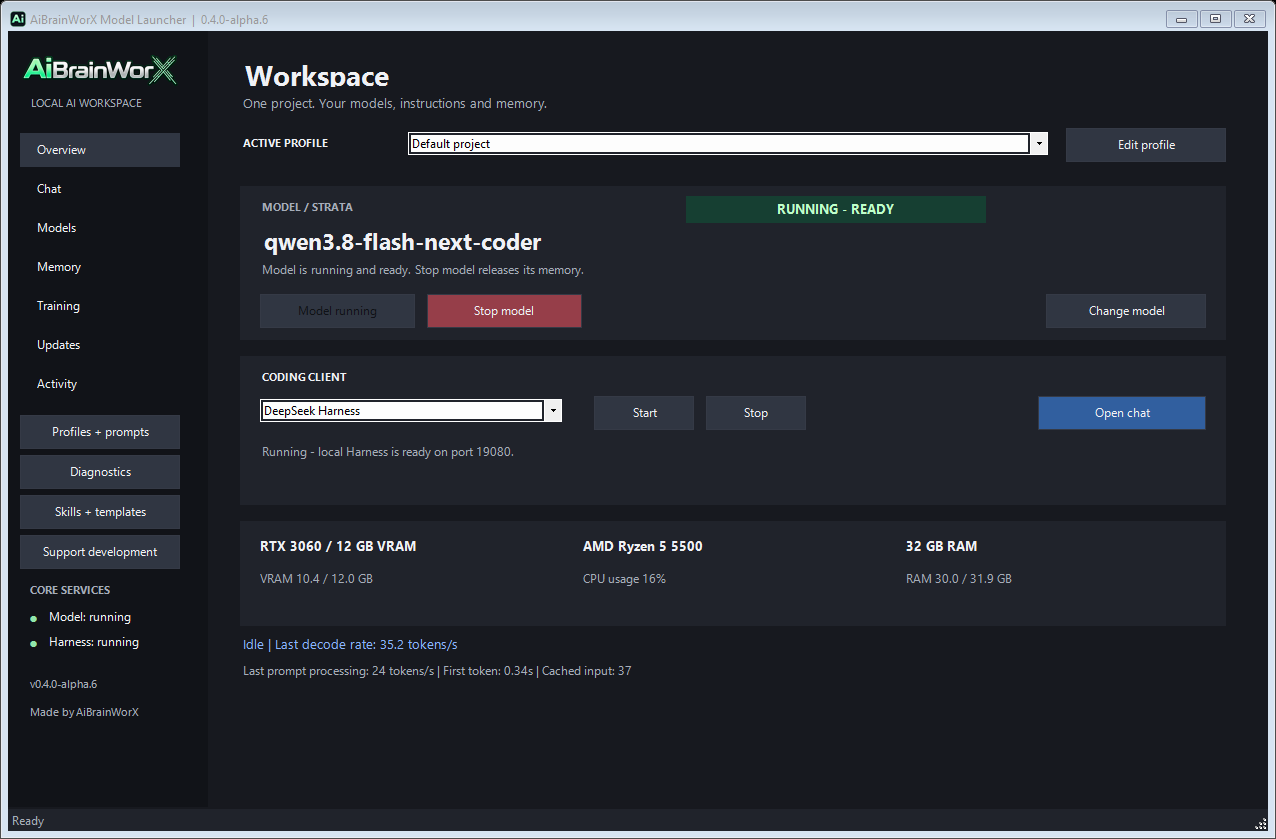
To work in DeepSeek Harness, select it under Coding Client, click Start, wait for readiness and choose Open chat. Begin with a small function in a safe test folder, inspect the result and run its test. An agent’s permissions determine what it can read and change.
Check updates without replacing your work
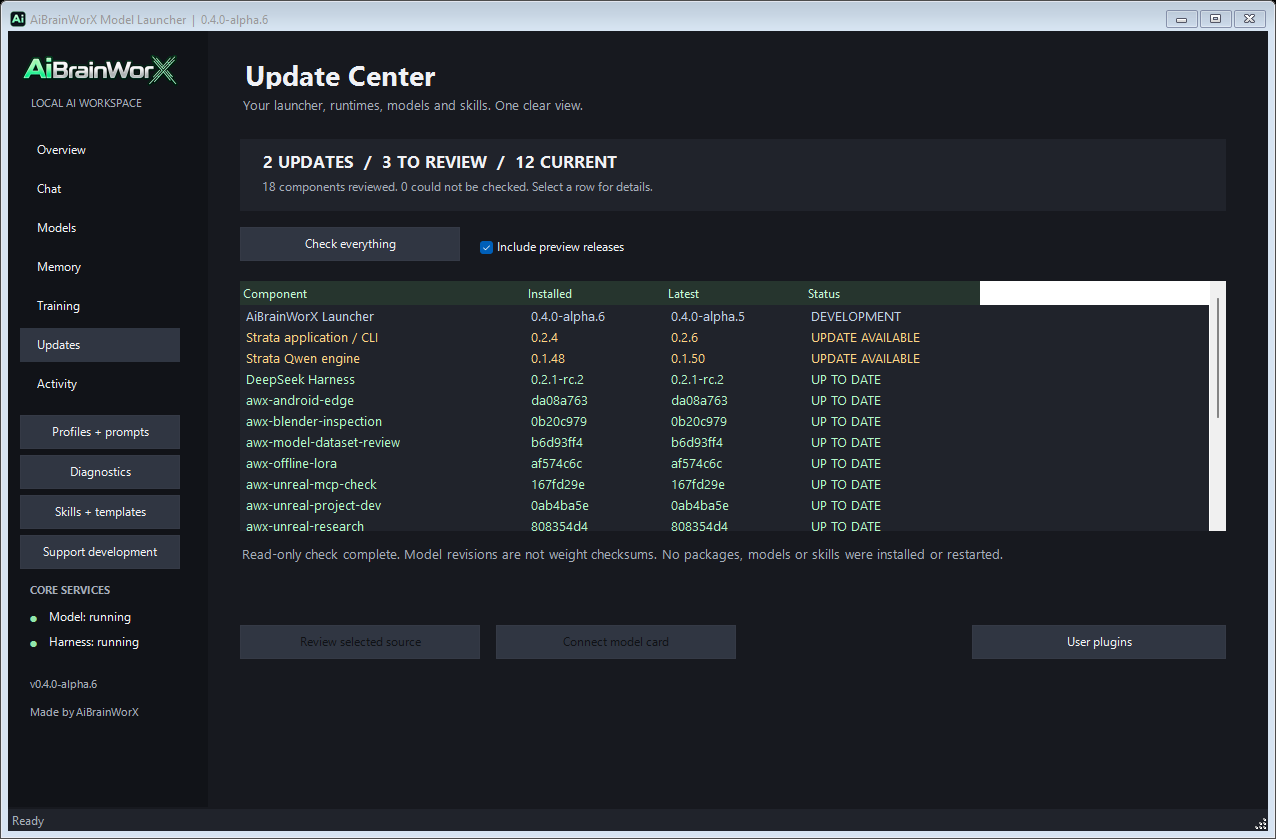
Open Updates and choose Check everything. Review the component and its source before taking action; checking is not an automatic installation. The image below is a historical capture of an actual alpha.6 update check made before alpha.6 was published, so the listed available versions are not a current feed.
Linux or WSL
Use the separate Linux repository. It requires Linux, Python 3.11+, SQLite and a browser; Ubuntu 24.04 WSL2 was the tested environment. Follow its README, extract the source and run:
bash Setup.sh
bash Launch.sh
Open the local URL printed by Launch.sh, normally http://127.0.0.1:8765, and configure an installed supported server and exact model ID. The optional Linux runtime installer has separate hardware and driver requirements and does not download model weights by default. The Windows performance numbers below are not a Linux benchmark.
What our last test measured
In the October 26 Windows test, the exact Qwen3.8-Flash-Next-GSQ-RCO-Coder-GGUF IQ1_M model through Strata produced 35.7, 45.1 and 44.5 generated tokens/s on three short completed cached runs with light monitoring. An uncached warmup was 17.4 tokens/s. A separate 46.0 result hit the output limit. These are individual observations with reasoning off, not a sustained-speed guarantee or proof that monitoring improved performance. See the full test conditions and chart.
If something stops
- Setup did not finish: Read the final message; use the Windows recovery guide and rerun setup after fixing the failed prerequisite.
- The model stays starting: Check the chosen engine’s console, free memory, storage and actual local endpoint. Initial loads can take minutes.
- The chat connects but cannot answer: Confirm the model is loaded, the model identifier matches the server, and a small reply completes.
- Harness does not respond: Start the client separately, wait for its ready status, then open chat. Confirm its configured model provider.
Do not post private paths, project files, API keys or logs containing credentials when asking for help. The guide’s screenshots show the launcher after setup; no installer-console screenshot is presented as a successful install.